Domains 4 and 2 ; Tool Design, MCP Integration, and Prompt Engineering
Tool descriptions as the primary selection mechanism, MCP configuration and transport selection, JSON schema design for structured output, few-shot versus descriptive instructions, batch API tradeoffs, and validation-retry loops. Together these cover 38 percent of the exam.
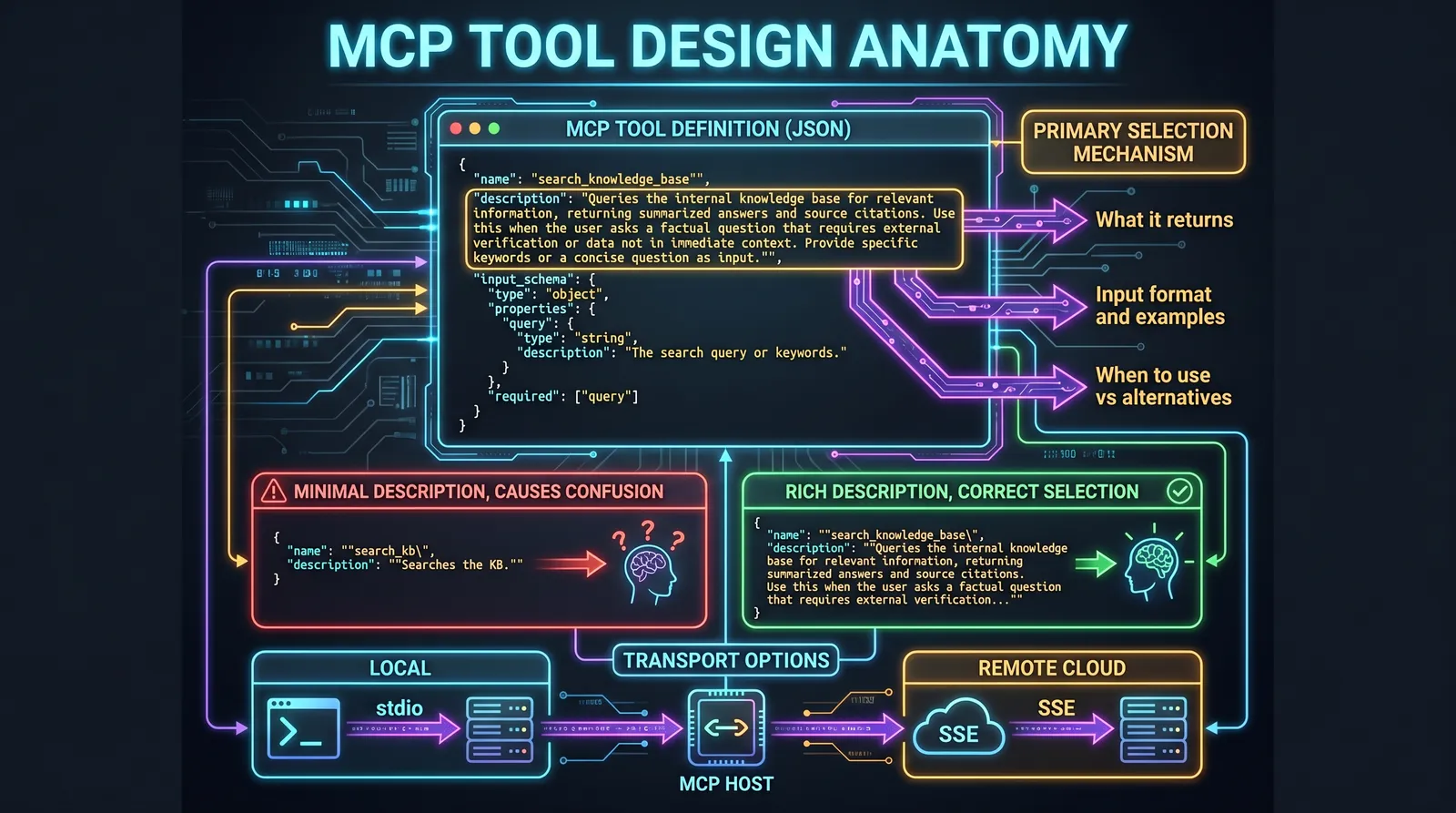
Domains 4 and 2 together represent 38 percent of the exam. Domain 4 (Tool Design and MCP Integration) is the most underestimated domain. Most candidates skip it and pay for it. The exam does not just ask about MCP configuration syntax. It tests whether you can write a tool description that causes the model to select correctly, and whether you can design an error response that gives the coordinator enough information to recover without human intervention.
Domain 4: Tool Design and MCP Integration (18%)
Tool Descriptions Are the Primary Selection Mechanism
This is the most important sentence in Domain 4: the model selects which tool to call based on its description. Not the tool name. Not the input schema. The description.
When you write a minimal description like "Retrieves customer information," you get unpredictable behavior when two tools have overlapping purposes. When you write a rich description, you get precise selection.
A minimal description that causes problems:
{
  "name": "analyze_document",
  "description": "Analyzes a document.",
  "input_schema": {...}
}
A rich description that causes correct selection:
{
  "name": "analyze_document",
  "description": "Analyzes a PDF or DOCX file for structure, key entities, and financial figures. Returns a structured JSON summary including document type, detected tables, named entities, and extracted numeric values. Use this tool BEFORE calling extract_line_items if the document format is unknown. Accepts a file path or base64-encoded bytes. Does NOT process images or scanned pages without OCR preprocessing.",
  "input_schema": {
    "type": "object",
    "properties": {
      "file_path": {"type": "string", "description": "Absolute path to the document file"},
      "format_hint": {"type": "string", "enum": ["pdf", "docx", "auto"], "description": "Document format. Use 'auto' if unknown."}
    },
    "required": ["file_path"]
  }
}
The exam frequently presents scenarios with two tools that have similar names and asks which description design prevents confusion. The answer is always the richer description that explicitly states what the tool returns, what formats it accepts, when to use it versus alternatives, and what it does not do.
Built-in tools versus MCP tools: Claude Code has built-in tools (Read, Grep, Glob, Write, Bash). If an MCP tool does something similar, the model may prefer the built-in tool because it is always available and familiar. The fix is to strengthen the MCP tool description by highlighting what concrete advantages it offers that the built-in tools cannot provide. Ambiguous or weak MCP descriptions lose to built-in tools.
The tool_choice Parameter
tool_choice controls whether and how the model selects tools.
| Value | Behavior | When to use |
|---|---|---|
{"type": "auto"} |
Model decides whether to call a tool or answer in text | Default for most scenarios |
{"type": "any"} |
Model must call some tool from the available set | When you need guaranteed structured output and any tool is acceptable |
{"type": "tool", "name": "extract_metadata"} |
Model must call this specific tool | When you need to guarantee a specific first step |
tool_choice: "any" is useful for structured output scenarios where you have multiple extraction tools and any of them produces the right format. The model picks the most appropriate one, but you always get structured output rather than a text response.
Forced tool selection (tool_choice: "tool") guarantees a specific first action. This is used in scenarios where the first step must always be the same regardless of the user's request, such as always calling extract_metadata before any other processing.
Structured Error Responses: the isError Pattern
When an MCP tool encounters an error, it uses isError: true in its response. The exam tests the difference between a generic error and a structured error that enables intelligent recovery.
A generic error response (anti-pattern):
{
  "isError": true,
  "content": "Operation failed"
}
This gives the coordinator zero information. Should it retry? Change the query? Escalate? The coordinator cannot decide.
A structured error response that enables recovery:
{
  "isError": true,
  "content": {
    "errorCategory": "transient",
    "isRetryable": true,
    "message": "Search service timeout after 30 seconds.",
    "attempted_query": "AI impact on music industry 2025",
    "partial_results": [
      {"title": "AI Music Generation Report 2025", "url": "...", "relevance": 0.8}
    ],
    "alternative_approaches": [
      "Try a narrower query: 'AI music composition tools 2025'",
      "Use the academic database instead of web search"
    ],
    "coverage_impact": "Music industry section may be incomplete"
  }
}
The structured error tells the coordinator: this is transient and retryable, here is what was attempted, here is what partial data was recovered, and here are alternatives to try. The coordinator can now make an autonomous recovery decision.
Silent suppression is an anti-pattern: returning an empty result on failure instead of isError: true is wrong. The coordinator interprets an empty result as "no matches found," which is a different condition from "the search failed." The exam tests this distinction.
MCP Server Configuration
Project configuration: .mcp.json at the project root. Committed to version control. Shared with all project contributors.
{
  "mcpServers": {
    "github": {
      "command": "npx",
      "args": ["-y", "@modelcontextprotocol/server-github"],
      "env": {
        "GITHUB_TOKEN": "${GITHUB_TOKEN}"
      }
    }
  }
}
Environment variables use ${VAR_NAME} expansion. The token value is never committed. The configuration structure is committed, and each developer provides their own token in their environment.
Personal configuration: ~/.claude.json in the user's home directory. Not committed. For personal experiments, testing, and individual preferences.
Exam rule: team-wide MCP server configuration belongs in .mcp.json (project-level, VCS-tracked). Individual experimentation and personal servers belong in ~/.claude.json (personal, not tracked).
MCP Transport Selection
MCP supports two transports. The exam tests which to use in which scenario.
| Transport | Use case | Key property |
|---|---|---|
| stdio | Local subprocess (same machine) | Simple, no network overhead, process management via host |
| SSE (Server-Sent Events) | Remote servers, cloud deployment | HTTP-based, supports streaming, works across network boundaries |
The rule is simple: stdio for local tools, SSE for remote tools. If the exam scenario has an MCP server running as a subprocess on the same machine as the host, stdio is correct. If the server is deployed to a cloud service or must be accessible over the network, SSE is correct.
MCP Resources versus Tools
Tools are functions the agent can call to perform actions. Resources are data the agent can read to get context without taking actions.
| Type | Purpose | Examples |
|---|---|---|
| Tools | Perform actions, CRUD operations, API calls | process_refund, create_ticket, send_email |
| Resources | Provide context for reading, no side effects | Document catalog, database schema, project task list |
Resources give the agent a map of available data without requiring exploratory tool calls. An agent with a resource exposing the project's task structure can move through it directly instead of calling multiple tools to discover what exists.
Domain 2: Prompt Engineering and Structured Output (20%)
Few-Shot Examples Beat Descriptive Instructions
This is the single most important rule in Domain 2, and the exam tests it repeatedly.
A vague instruction like "be more precise in your categorization" can be interpreted in multiple ways. An example showing the expected input and output unambiguously communicates format, decision logic, and edge case handling. The model generalizes the pattern to new cases rather than just repeating the examples.
When to use few-shot examples:
For ambiguous scenarios where multiple responses are valid:
Request: "My order is broken"
Action: Call get_customer, then lookup_order, then check item status.
Reason: "broken" may mean damaged, wrong item, or not working. Order details are needed before any action.

Request: "Get me a manager"
Action: Call escalate_to_human immediately.
Reason: Explicit request for a human. Do not attempt autonomous resolution.
For output formatting, where tone, length, and structure must be consistent:
{
  "location": "src/auth/login.ts:42",
  "issue": "SQL injection via unsanitized username parameter",
  "severity": "critical",
  "suggested_fix": "Use a parameterized query"
}
For separating acceptable from problematic code during review:
Acceptable (do not flag):
const items = data.filter(x => x.active);

Problematic (flag with severity low):
const items = data.filter(x => x.active == true); // Use strict equality
Few-shot examples are especially effective for informal measurements, ambiguous inputs, and any scenario where the boundary between correct and incorrect is non-obvious from a description alone.
JSON Schema Design for Structured Output
Using tool_use with a JSON schema is the most reliable way to get structured output from Claude. The schema guarantees syntactically valid JSON. It does not guarantee semantic correctness. The exam tests schema design decisions directly.
Required versus nullable fields:
Mark a field as required only if the information is always present in the source. Marking an optional field as required forces the model to fabricate a value when the information does not exist.
Use "type": ["string", "null"] for fields that may be absent. The model can return null instead of hallucinating a value.
{
  "type": "object",
  "properties": {
    "invoice_date": {
      "type": "string",
      "description": "Invoice date in ISO 8601 format (YYYY-MM-DD)"
    },
    "due_date": {
      "type": ["string", "null"],
      "description": "Payment due date, or null if not specified in the document"
    },
    "total_amount": {
      "type": "number",
      "description": "Total invoice amount in the document's currency"
    },
    "currency": {
      "type": ["string", "null"],
      "description": "ISO 4217 currency code, or null if not specified"
    },
    "category": {
      "type": "string",
      "enum": ["invoice", "receipt", "credit_note", "other", "unclear"]
    }
  },
  "required": ["invoice_date", "total_amount", "category"]
}
Enum design with "other" and "unclear":
Always include "other" in enums to capture data that does not fit predefined categories. Add "unclear" for cases where the model cannot confidently pick a category. An honest "unclear" is better than a wrong categorization. If you have "other" or "unclear", add a companion string field for details.
Syntax versus semantic errors:
JSON schemas prevent syntax errors (invalid JSON, missing braces, wrong field types). They do not prevent semantic errors (a total field that does not match the sum of line items, a date that contradicts the document). Semantic validation requires application-layer checks after receiving the JSON.
The Validation-Retry Loop
When extracted data fails validation, retry with specific error context. The retry must include three things: the original source document, the previous (incorrect) extraction, and the specific error message.
def extract_with_retry(document, max_retries=2):
    result = extract(document)

    for attempt in range(max_retries):
        errors = validate(result)
        if not errors:
            return result

        # Retry with specific error context
        result = extract_with_error_context(
            document=document,
            previous_extraction=result,
            error_message=f"Validation failed: {errors[0]}"
        )

    return result
When retries help versus when they do not:
Retries help for format errors (date in wrong format), structural errors (value in wrong field), and arithmetic inconsistencies (the model can recalculate). Retries do not help when the information is genuinely absent from the source document. If the invoice does not contain a due date, no number of retries will produce one.
Prompt Chaining
Prompt chaining breaks a complex task into a sequence of focused steps where each step receives only the output it needs from the previous step.
Step 1: Analyze auth.ts for local issues only.
Step 2: Analyze database.ts for local issues only.
Step 3: Integration pass. Given the issues found in steps 1 and 2, identify cross-file interactions and boundary problems.
Why a single pass over all files at once produces worse results: attention dilution causes the model to provide shallow analysis for some files, miss bugs in others, and flag the same pattern inconsistently across files. Chaining forces focused attention.
Prompt chaining versus dynamic decomposition:
- Prompt chaining is correct for predictable, repeatable workflows where all steps are known upfront: code review, document extraction pipelines, file migrations.
- Dynamic decomposition is correct for open-ended investigations where subtasks become clear only during execution: debugging an unfamiliar system, researching an open-ended question.
Batch API Tradeoffs
The Batch API processes requests asynchronously with up to 50 percent cost savings at the expense of latency.
| Attribute | Value |
|---|---|
| Cost savings | 50% versus synchronous |
| Processing window | Up to 24 hours, no latency SLA |
| Multi-turn conversations | Not supported |
| Best use cases | Bulk processing, overnight jobs, non-urgent analysis |
When NOT to use the Batch API (exam traps):
The exam presents Batch API as an option in many scenarios. The correct answer is Batch API only when the use case tolerates up to 24 hours of latency.
| Scenario | Correct API | Why |
|---|---|---|
| Pre-merge code review (developer waiting) | Synchronous | Developer needs immediate feedback |
| Weekly security audit report | Batch | Not urgent, saves 50% |
| Interactive customer support | Synchronous | Real-time response required |
| Nightly processing of 10,000 documents | Batch | Bulk, not time-sensitive |
| CI/CD pipeline check that blocks merge | Synchronous | Must complete before merge |
| Overnight tech debt analysis | Batch | Result needed by morning, not immediately |
If the exam scenario has a developer, user, or system waiting for a response before they can proceed, the answer is synchronous. If the work can run overnight or over the weekend, Batch API is correct.
The custom_id field links batch requests to their results. On partial batch failure, you identify failed items by their custom_id and resubmit only those, avoiding reprocessing successful items.
Format Normalization in Structured Extraction
When using strict JSON schemas, add explicit normalization rules in the prompt for values that appear in multiple formats across source documents:
Normalization rules:
- Dates: always ISO 8601 (YYYY-MM-DD). Convert "March 5, 2025", "05/03/25", and "yesterday" to absolute ISO dates.
- Currency: numeric amount plus ISO 4217 code. Convert "five thousand dollars" to {"amount": 5000, "currency": "USD"}.
- Percentages: decimal fraction. Convert "half" to 0.5, "75%" to 0.75.
- Phone numbers: E.164 format. Convert "(813) 555-0123" to "+18135550123".
Without normalization rules, the JSON may be syntactically valid but contain inconsistent value formats that break downstream processing.