Domains 1 and 3 ; Agentic Architecture and Claude Code Configuration
The two heaviest exam domains: stop_reason control flow, hub-and-spoke multi-agent design, hooks versus prompts, CLAUDE.md hierarchy, path-scoped rules, and CI/CD integration. Together these cover 47 percent of the exam.
Domains 1 and 3 together represent 47 percent of the exam. Domain 1 (Agentic Architecture and Orchestration) at 27 percent is the single heaviest domain. Domain 3 (Claude Code Configuration and Workflows) at 20 percent rewards candidates with hands-on Claude Code experience. Candidates who fail this exam typically have one domain below 50 percent, and Domain 1 is the most common culprit.
Domain 1: Agentic Architecture and Orchestration (27%)
The Agent Loop and stop_reason
The agentic loop is the core pattern for every agent on the exam. Understanding it precisely is not optional.
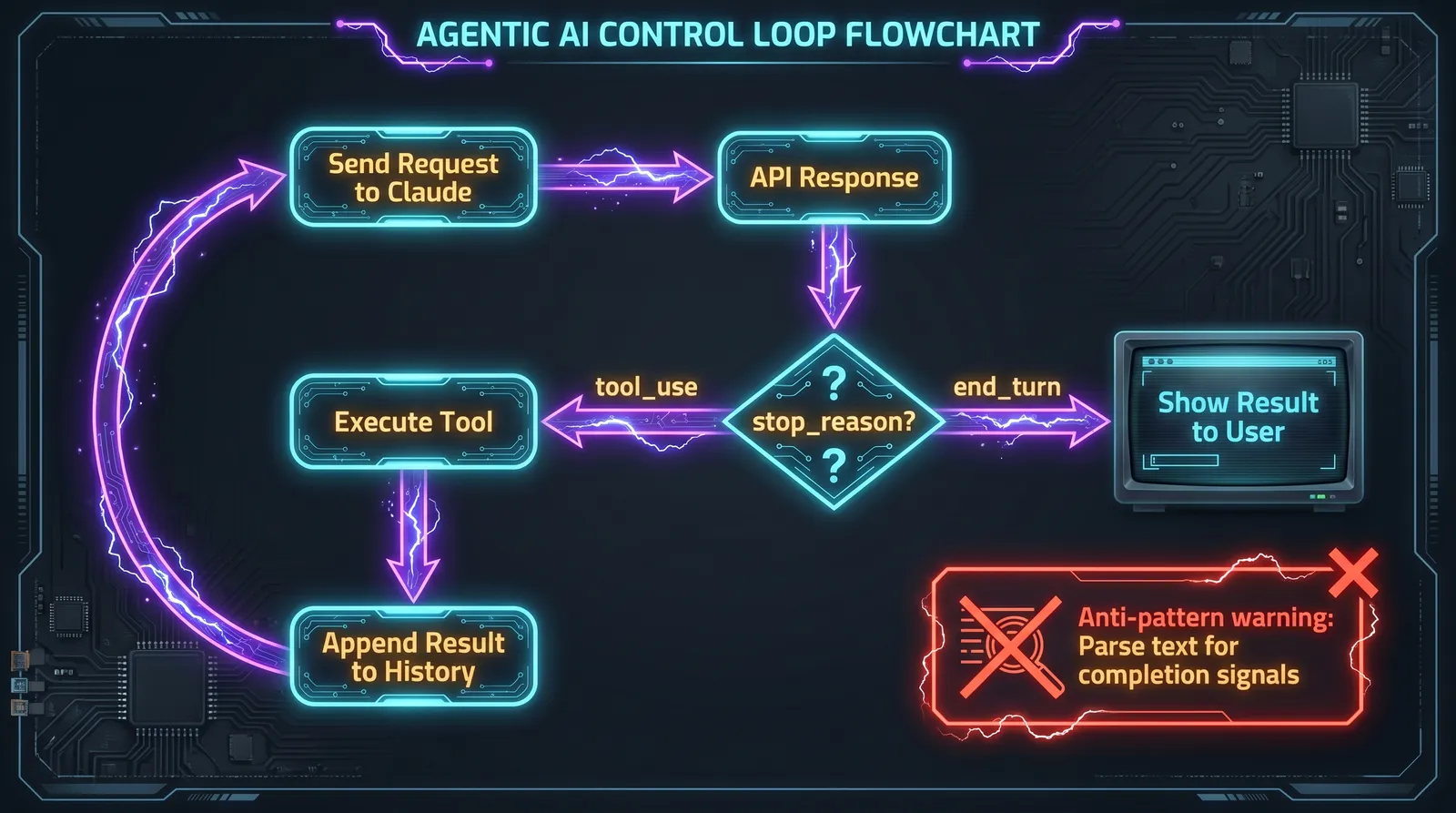
Every API call returns a stop_reason field. The correct response to each value is different, and the exam tests this distinction repeatedly.
| stop_reason | Meaning | Correct action |
|---|---|---|
"tool_use" |
The model wants to call a tool | Execute the tool, append the result to message history, call the API again |
"end_turn" |
The model has finished its response | Show the result to the user. The task is complete. |
"max_tokens" |
Token limit was reached | Response is truncated. Increase the limit or split the task. |
"stop_sequence" |
A configured stop sequence was encountered | Handle based on your application logic |
For agentic systems, "tool_use" and "end_turn" control everything. The loop runs until stop_reason == "end_turn". That is the only reliable completion signal.
Anti-patterns the exam tests directly:
Parsing the assistant's text content to detect completion is always wrong. Checking whether the assistant produced text as a completion signal is always wrong. Using an arbitrary iteration limit as the primary stop condition is wrong. The exam presents these as tempting distractors.
The correct pattern:
while True:
    response = client.messages.create(
        model="claude-sonnet-4-6",
        tools=tools,
        messages=messages
    )

    if response.stop_reason == "end_turn":
        return response.content[0].text

    if response.stop_reason == "tool_use":
        tool_result = execute_tool(response)
        messages.append({"role": "assistant", "content": response.content})
        messages.append({"role": "user", "content": [tool_result]})
Hub-and-Spoke Multi-Agent Architecture
The exam consistently tests the hub-and-spoke topology. One coordinator agent decomposes the task and delegates to specialized subagents. The coordinator aggregates results. There is no direct communication between subagents.
The coordinator's responsibilities:
- Decompose the task into subtasks
- Select which subagents to invoke (static or dynamic)
- Pass all required context explicitly to each subagent
- Aggregate and validate results
- Handle errors and retries
- Communicate final results to the user
Critical rule: subagents have isolated context. Subagents do not inherit the coordinator's conversation history. They do not share memory. Every piece of context a subagent needs must be passed explicitly in its prompt. This is the single most tested concept in Domain 1, and the source of the most common wrong answers.
# Wrong: subagent has no context
task_prompt = "Analyze the document"

# Correct: full context explicitly passed
task_prompt = f"""
Analyze the following document.

Document content:
{document_content}

Prior search results from the research subagent:
{search_results}

Required output format:
{output_schema}
"""
A coordinator can spawn multiple subagents in a single response by calling multiple Task tool invocations. The SDK runs these in parallel. This is the correct way to achieve parallelism, not sequential invocations.
The Task Tool
Subagents are spawned via the Task tool. The coordinator's allowed_tools must include "Task" for this to work. Each Task call creates a fresh, isolated agent context.
coordinator = AgentDefinition(
    name="research_coordinator",
    system_prompt="You are a research coordinator...",
    allowed_tools=["Task", "get_customer"],  # Task enables subagent delegation
)
Hooks: Deterministic Enforcement
Hooks intercept the agent lifecycle at specific points. This is where the exam draws its sharpest line.
The rule: when failure has financial, legal, or safety consequences, use a hook, not a prompt instruction.
| Enforcement type | Guarantee | When to use |
|---|---|---|
| Hooks | Deterministic (100%) | Financial thresholds, compliance rules, security policy |
| Prompt instructions | Probabilistic (90%+, not 100%) | Preferences, formatting, recommendations |
A prompt instruction like "only process refunds under $500" works most of the time. A hook that blocks refunds over $500 works every time. The exam asks which approach is correct for a financial enforcement scenario. The answer is always hooks.
PreToolUse hook intercepts a tool call before execution:
@hook("PreToolUse")
def enforce_refund_limit(tool_call):
    if tool_call.name == "process_refund":
        if tool_call.args["amount"] > 500:
            return redirect_to_escalation(tool_call)
    return tool_call
PostToolUse hook intercepts a tool result before it returns to the model:
@hook("PostToolUse")
def trim_order_fields(tool_result):
    # Keep only the 5 fields the model needs from the 40 fields returned
    return {
        "order_id": tool_result["order_id"],
        "status": tool_result["status"],
        "total": tool_result["total"],
        "items": tool_result["items"],
        "return_eligible": tool_result["return_eligible"]
    }
PostToolUse hooks are used to normalize data formats, reduce context bloat from verbose tool results, and transform outputs before the model sees them.
Escalation Triggers
The exam tests which situations require immediate escalation to a human, which require an attempt to resolve first, and which are not escalation triggers at all.
Escalation immediately:
- Customer explicitly requests a manager or human. Do not attempt to solve. Escalate on the first request.
- Policy does not cover the request. For example, competitor price matching when policy is silent on the topic.
- Financial operation exceeds a threshold (enforce via hook, not prompt).
Escalation after a resolution attempt:
- Customer expresses frustration but does not explicitly request a human. Acknowledge, offer resolution, escalate only if they reiterate the desire for a human.
- The agent cannot make progress after a defined number of attempts.
Not reliable escalation triggers (exam traps):
- Sentiment analysis of customer messages. Angry customers are not necessarily complex cases.
- Model self-reported confidence scores of 1 to 10. The model can be confidently wrong.
- An automatic classifier routing by category. Overengineering that may require training data.
Minimal footprint principle: agents should never escalate their own permissions. If an operation requires a permission the agent does not have, that is an escalation trigger, not a reason for the agent to acquire more permissions autonomously.
Error Categories in Multi-Agent Systems
When a subagent fails, the error response must give the coordinator enough information to decide how to recover. A generic "operation failed" string is an anti-pattern.
| Error category | Retryable | Coordinator action |
|---|---|---|
| Transient (timeout, 503) | Yes | Retry with exponential backoff |
| Validation (bad input format) | Yes with modification | Fix input, retry |
| Business (policy violation) | No | Explain to user, propose alternative |
| Permission (access denied) | No | Escalate to human |
The structured error response pattern:
{
  "isError": true,
  "content": {
    "errorCategory": "transient",
    "isRetryable": true,
    "message": "Search service timed out after 30 seconds.",
    "attempted_query": "AI music industry 2025",
    "partial_results": [{"title": "...", "relevance": 0.8}],
    "alternative_approaches": ["Try narrower query: 'AI music composition tools'"]
  }
}
Partial results matter. Aborting a subagent workflow on one failure and losing all partial results is an anti-pattern. The correct pattern is to continue with partial results, annotate coverage gaps, and let the coordinator decide whether to retry or continue with reduced coverage.
Domain 3: Claude Code Configuration and Workflows (20%)
The CLAUDE.md Hierarchy
CLAUDE.md is the instruction file system for Claude Code. There are three levels, each with different scope and sharing behavior.
| Level | Location | Scope | Shared via VCS |
|---|---|---|---|
| User-level | ~/.claude/CLAUDE.md |
That user only, all projects | No |
| Project-level | .claude/CLAUDE.md or root CLAUDE.md |
All contributors to the project | Yes |
| Directory-level | CLAUDE.md in a subdirectory |
Files in that directory and below | Yes |
The most common exam trap: a new team member does not receive project coding standards because someone placed them in ~/.claude/CLAUDE.md (user-level, not shared) instead of .claude/CLAUDE.md (project-level, shared via version control).
Rules narrow as you go deeper. A directory-level CLAUDE.md adds specificity for that part of the codebase without overriding the project-level rules.
The settings.json Hierarchy
Separate from CLAUDE.md, settings.json files control runtime behavior: tool permissions, allowed tools, allowlists, and denylists.
| File | Scope | Committed to VCS |
|---|---|---|
~/.claude/settings.json |
Machine-wide, all projects for that user | No |
.claude/settings.json |
Project-wide, all contributors | Yes |
.claude/settings.local.json |
Personal overrides for this project | No |
Tool permission allowlists belong in committed project-level settings.json, not in CLAUDE.md natural language instructions. CLAUDE.md is for behavioral guidelines. settings.json is for programmatic permission control.
@path Syntax for File Imports
CLAUDE.md can import other files using @path syntax. This keeps configuration modular and avoids duplication:
# Project CLAUDE.md
Coding standards: @./standards/coding-style.md
Test requirements: @./standards/testing-requirements.md
Project overview: @README.md
Rules for @path:
- No space between
@and the path - Relative paths resolve relative to the file containing the import
- Maximum nesting depth is 5
- Supports both relative and absolute paths
The .claude/rules/ Directory
.claude/rules/ is an alternative to a monolithic CLAUDE.md. Each file in this directory covers one topic. The key feature is YAML frontmatter with paths for conditional loading.
---
paths: ["src/api/**/*"]
---

For API files, use async/await with explicit error handling.
Each endpoint must return a standard response wrapper.
---
paths: ["**/*.test.tsx", "**/*.test.ts"]
---
Tests must use describe/it blocks.
Use data factories instead of hardcoding test data.
Do not mock the database. Use a test database.A rule file loads only when Claude Code edits a file matching the paths pattern. This saves context, reduces token cost, and prevents irrelevant rules from appearing during unrelated work.
When to use .claude/rules/ with paths versus directory-level CLAUDE.md:
- Use
.claude/rules/withpathswhen conventions apply to files scattered across many directories, such as tests, migrations, or a specific file type. - Use directory-level CLAUDE.md when conventions are specific to one directory and its contents.
Custom Slash Commands and Skills
Custom commands live in .claude/commands/ or .claude/skills/ and are invoked with /name. Project commands in these directories are version-controlled and available to everyone who clones the repository.
Skills configured with frontmatter unlock additional behavior:
---
context: fork
allowed-tools: ["Read", "Grep", "Glob"]
argument-hint: "Path to the directory to analyze"
---

Analyze the code structure in the specified directory.
Output a report on dependencies and architectural patterns.| Frontmatter parameter | Effect |
|---|---|
context: fork |
Runs the skill in an isolated subagent. Verbose output does not pollute the main session context. |
allowed-tools |
Restricts which tools the skill can use. Limits blast radius. |
argument-hint |
Prompts for an argument when invoked without parameters. |
When to use a skill versus CLAUDE.md: skills are on-demand invocations for specific tasks. CLAUDE.md carries always-loaded standards and conventions that apply to all work in a project.
Planning Mode versus Direct Execution
Planning mode is explicitly for situations where you need investigation before action. The exam tests when each mode is appropriate.
Use planning mode:
- Large changes spanning dozens of files
- Multiple plausible approaches with non-obvious tradeoffs
- Architectural decisions that affect the overall structure
- Unfamiliar codebases where understanding must precede changing
Use direct execution:
- Single-file fixes with a clear stack trace
- Adding one validation check
- Well-understood, unambiguous changes
Planning mode produces an implementation plan the user approves before any code is written. It uses only Read, Grep, and Glob during the planning phase. No side effects.
The -p Flag for CI/CD
The -p or --print flag switches Claude Code into non-interactive mode. It processes the prompt, prints to stdout, and exits. This is the correct way to integrate Claude into CI/CD pipelines.
claude -p "Analyze this pull request for security vulnerabilities" --output-format jsonUsing --output-format json with a --json-schema enables structured output that downstream pipeline steps can parse to create inline PR comments automatically.
Session isolation for code review: the same Claude session that generated code is less effective at reviewing it. The model retains its own reasoning context and is less likely to challenge its own decisions. Use an independent Claude instance for review. This is an architectural decision the exam tests.
Preventing duplicate review comments: when re-reviewing after new commits, include prior review results in context and instruct Claude to report only new or unresolved issues.
The /compact Command and Context Management
/compact compresses conversation history to free up context window space during long sessions. The risk is precision loss: exact numeric values, dates, and specific identifiers can become vague after summarization.
The correct mitigation is extracting transactional facts into a structured block before compaction, then appending that block to every subsequent prompt. Never rely on summarized history for values that must remain exact.
/memory opens CLAUDE.md for editing, allowing persistent notes and preferences across sessions. Information written to CLAUDE.md via /memory is automatically loaded on session start.